


Page 37 - Activity book 6A
P. 37
Lesson 9, part 2
Literacy: r
Literacy: r Lesson 8, part 2 Lesson 9, part 2 Literacy: reviewseviews 2 2
Literacy: reviewseviews
Lesson 8, part 2
Writingriting
Reading W
Reading
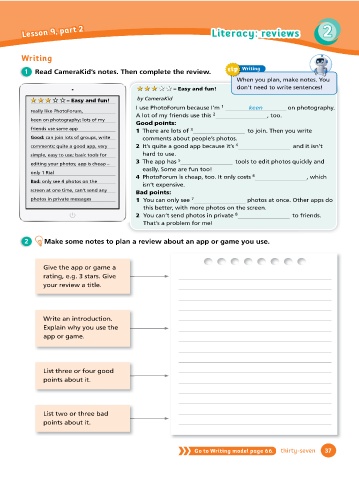
tip Writing
Words in context 1 Read CameraKid’s notes. Then complete the review.
When you plan, make notes. You
don’t need to write sentences!
1 Read and complete the sentences.
★ ★ ★
★ ★ ★ ★ ★★ ★ – Easy and fun!
solve play give score program challenge by CameraKid
★ ★ ★ ★ ★ ★ ★ – Easy and fun!
★ ★ ★
1
I use PhotoForum because I’m keen on
1 When you need to solve a problem, it often helps to ask a friend. . really like PhotoForum, keen on photography.
2 That game is too easy. yourself with something diffi cult! photography; lots of my friends A lot of my friends use this 2 , too.
use same app Good points:
3 I want to learn how to a computer, so I can design games.
Good: can join lots of groups, 1 There are lots of 3 to join. Then you
4 In that game, players points by collecting secret messages. write comments about people’s photos.
write comments; quite a good
5 If you want to online, you need a fast internet connection. app, very simple, easy to use; basic 2 It’s quite a good app because it’s 4 and
6 You can tips to your friends so you can all play the game better. tools for editing your photos; app it isn’t hard to use.
3 The app has 5 tools to edit photos
is cheap – only 1 Rial quickly and easily. Some are fun too!
2 Read the text on Class Book page 54 again. Who gives these facts about TopCity? Bad: only see 4 photos on the 4 PhotoForum is cheap, too. It only costs
Write GameFan or MrCool001. screen at one time, can’t send any 6 , which isn’t expensive.
photos in private messages Bad points:
1 Two or more people can play together. MrCool001 1 You can only see 7 photos at once.
Other apps do this better, with more photos on the
2 The problems get more diffi cult as you play.
screen.
3 You have to visit all the buildings in the city. 2 You can’t send photos in private 8 to
4 The game can’t be used with all phones. friends.
2 Make some notes to plan a That’s a problem for me!
5 Players write instructions to move around. review about an app or game
6 The game gives you tips to play better. you use.
3 Answer the questions. Write complete sentences. Give the app or game a
rating, e.g. 3 stars. Give
1 What do TopCity players search for during 3 What does GameFan have to do before he
the game? can start playing? your review a title.
They search for treasure.
2 What device does GameFan use to play 4 How did MrCool001 learn to play the game Write an introduction.
the game? better? Explain why you use the
app or game.
4 Work in groups. Discuss the survey questions and make notes. Then share your ideas List three or four good
with the class. points about it.
1 What computer programs do you use 3 How long are you usually online every
the most? day?
List two or three bad
2 What apps do you have on your tablet? 4 What are your favourite computer
points about it.
games? Why?
36 thirty-six Go to Writing model page 66. thirty-seven 37

