


Page 53 - Class book 6A
P. 53
Lesson 6, part 2
        Lesson 6, part 2                                                       Projectroject               1 1 2 2
                                                                               P
                                                                    Make a spider diagram poster
                                                                   about technology and learning

           1      Watch the video.

           2    In groups, think about the different devices you use at home and
              at school, and how they can help you learn.


                                At school, we can watch           At home, we can find
                                 videos on computers.            information on tablets.


          3    Choose four or fi ve devices that you would most like to include in the diagram.
              1                                                      3

              2                                                      4

          4    Decide who will write about each device.
                                                                          tip
                                                                          tip
                            I’d like to write about                               Writing
                                 smartphones.                               You can use these phrases

                                                                            in your information:
                                                                            You can use … to help you to …
          5        Make a spider diagram.                                   … are very good at teaching you
                                                                            about …
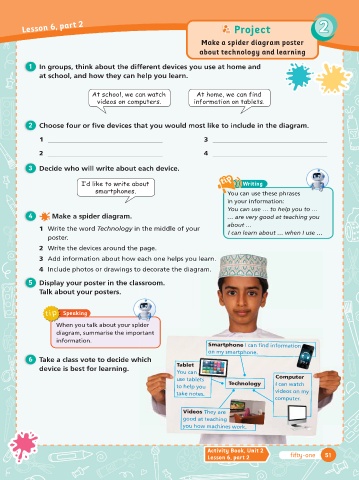
              1   Write the word Technology in the middle of your            I can learn about … when I use …
                 poster.
                                               page.
              2  Write the devices around the page.
                                               each one helps you learn.
              3  Add information about how each one helps you learn.
                                              o decorate the diagram.
              4  Include photos or drawings to decorate the diagram.
                                               ssroom.
          6    Display your poster in the classroom.
              Talk about your posters.


                tip   Speaking

                    When you talk about your spider ider
                    diagram, summarise the important                  Smartphone I can fi  nd information
                                              ortant
                    information.                                      on my smartphone.            on

                                                            Tablet
                                               hich
           7    Take a class vote to decide which
                                                            You can
              device is best for learning.                  use tablets                     Computer
                                                                  ets
                                                            to help you      Technology     I can watch
                                                                                            videos on my
                                                           take notes.
                                                                                            computer.
                                                              Videos They are
                                                              good at teaching
                                                              you how machines work.


                                                                      Activity Book, Unit 2
                                                                      Lesson 6, part 2           fifty-one   51

